

Los catálogos de las bibliotecas utilizan la lógica booleana para leer sus búsquedas y entregar listas de resultados. La lógica booleana es un sistema básico de lógica verdadero/falso basado en el trabajo del matemático George Boole. Se basa en los tres operadores AND, OR y NOT. La mayoría de los lenguajes de programación de computadoras tienen una forma de expresar y leer estos operadores, y han sido una parte fundamental de las búsquedas en bibliotecas digitales durante décadas.
Esta guía usará cursiva para indicar los términos de búsqueda, ya que las comillas y otros signos de puntuación, como verás, tienen significados específicos que cambiarán tu búsqueda. Para evitar confusiones, los títulos de obras y las palabras con énfasis serán subrayado. No necesitas usar cursiva al buscar en el DTL. De manera similar, esta guía pondrá los tres operadores booleanos básicos en mayúsculas, como están en el párrafo anterior a este, para que sean fáciles de ver e identificar como operadores. El sistema de la biblioteca no distingue entre mayúsculas y minúsculas. Puedes escribir los operadores en mayúsculas si rogers y Rogers.
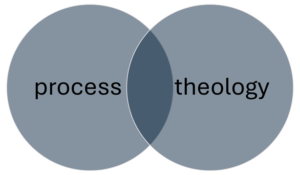
El operador más común y predeterminado es AND. Cuando escribes una frase de varias palabras en la barra de búsqueda, como teología del proceso, el sistema lee Proceso y teología. Buscará cualquier registro que contenga ambos las palabras proceso y teología en cualquier parte del registro, pero no hará diferencia si esas palabras se usan juntas o cómo se usan. Así que un libro titulado Teología del Proceso como Teología Política aparece en la misma lista de resultados que un libro titulado Teología intercultural con la palabra genérica “proceso” en algún lugar de la descripción.
Eso no significa que este método de búsqueda tan básico no funcione. Dado que “teología del proceso” es un término técnico y hay muchos libros y artículos en el DTL al respecto, si simplemente buscas la frase teología del proceso encontrarás mucho material útil. De hecho, si solo escribes proceso, obtienes la revista Estudios de procesos en la primera página de resultados. Sin embargo, también aparecen muchos resultados irrelevantes, así que si te encuentras revisando un montón de resultados que no te sirven, tal vez debas replantearte cómo formulas tu búsqueda.
Agregar más palabras naturalmente reducirá tu búsqueda. Si hay 10.000 registros con ambos proceso y teología en algún lugar dentro de ellos, agregando filosofía eliminará cualquiera de esos 10,000 sin esa tercera palabra. Cuantas más palabras agregues a una búsqueda básica como esta, más específica y, por lo tanto, más limitada será. La mayoría de las veces puedes encontrar un libro o artículo específico simplemente escribiendo el apellido del autor y dos o tres palabras importantes del título. Ve al DTL y busca la frase El graffiti de Rogers God. Deberías conseguir el libro del profesor Frank Rogers del CST Encontrando a Dios en el Graffiti como primer o segundo resultado.
- Consejo: A veces, mientras escribes, el sistema te mostrará una lista desplegable con posibles términos de búsqueda. Puedes seleccionar uno de esos términos si coincide con lo que estás buscando, o puedes ignorar la lista y escribirlo por tu cuenta. Si decides ignorar la lista desplegable, es posible que tengas que hacer clic manualmente en el botón de búsqueda que se encuentra a la derecha de la barra de búsqueda, ya que a veces el primer elemento de la lista se selecciona automáticamente; por lo tanto, si simplemente presionas la tecla de retorno para buscar, se buscará ese elemento en lugar de lo que escribiste. Todos los sistemas informáticos tienen sus pequeñas características molestas, y esta es una de las del catálogo DTL.
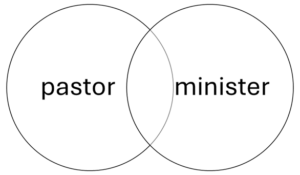
Una forma útil de cambiar tu forma de buscar es con el operador OR. Este operador es muy útil cuando trabajas con sinónimos. La búsqueda proceso O teología encontrará todos los registros con la palabra proceso y cada registro con la palabra teología, incluyendo registros de ambos. Probablemente sea demasiado, y la mayoría no estarán relacionados. Pero quizás esté buscando materiales sobre profesionales religiosos protestantes. Puede escribir pastor O ministro para obtener una gama más amplia de resultados que si solo buscaras una de las palabras por sí sola. Esta redacción tiene en cuenta el hecho de que existen múltiples formas, a veces intercambiables, de referirse a alguien que lidera una iglesia protestante, y no puedes estar seguro de cuál podría usar un libro o artículo útil.
Dado que OR probablemente encontrará un número mucho mayor de resultados que AND, es mejor usarlo con cuidado o en combinación con otros operadores.
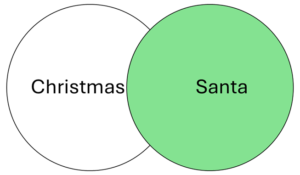
Este es el operador más desafiante, porque es fácil eliminar accidentalmente cosas que podrías querer ver. Es mejor usar NOT cuando buscas un término que tiene usos en múltiples contextos muy diferentes o si quieres eliminar elementos en un subtema oscuro.
Digamos que quieres investigar sobre la Navidad, pero no te interesan los materiales sobre Santa Claus. Puedes buscar Navidad NO Papá Noel, (la sección de comillas de abajo explicará cómo poner el nombre completo Santa Claus en esta búsqueda), pero eso podría significar que no verá registros de libros que serían mayormente útiles pero que, casualmente, tienen un capítulo sobre Santa Claus que se puede omitir fácilmente. Este podría no ser un buen momento para usar NO.
Sin embargo, NO puede ser útil en otros casos. Quizás escribiste Navidad al catálogo y obtener millones de resultados, pero por alguna razón muchos de los mejores resultados son materiales sobre la planta a la que a veces se le llama cactus de Navidad. En este caso, puedes intentar Navidad NO cactus o Navidad NO botánica o algo similar para eliminar esos resultados irrelevantes. La DTL tiene acceso a muchas revistas médicas porque vienen incluidas con algunas otras suscripciones, por lo que podrías encontrarte en situaciones en las que al agregar NO es medicina o similar pueden ayudar a organizar tus resultados.
También puedes usar NOT para excluir temas más oscuros de tus resultados. Santa Claus es un aspecto muy integrado de la Navidad en Estados Unidos, por lo que usar NOT para evitar materiales sobre Santa podría salir mal. Sin embargo, el personaje europeo Krampus ha ganado mucha visibilidad en EE. UU. recientemente, por lo que si no te interesan las celebraciones navideñas alemanas y austriacas, tal vez la frase Navidad NO Krampus te ayudará a acotar tu búsqueda.
- Consejo: Generalmente, es más efectivo agregar un Y a tu búsqueda en lugar de un NO. Alejandría Y Egipto te dará resultados más relevantes que Alejandría NO Virginia, tanto porque identifica positivamente a tu objetivo, como porque no eliminarás accidentalmente libros sobre la ciudad egipcia que casualmente fueron escritos por académicas llamadas Virginia.
- Consejo: Las frases NO dependen del orden, lo que significa que Navidad NO Papá Noel es una búsqueda diferente a Santa NO Navidad. Consulte la sección a continuación sobre paréntesis para obtener más información sobre la sintaxis y el orden en las cadenas de búsqueda.
This section is for people who want to do deep searches, such as finding all or nearly all of the available literature on a topic. It includes a basic description of the technical structures underlying the operations that this guide has already discussed. This provides context for why the catalog works the way it does, which will be helpful as you try to get the most out of it.
Each item in a library catalog has a unique record created using a database cataloging format called machine readable cataloging (MARC). A MARC record consists of many fields whose contents are determined by numbers. For example, field 100 indicates the primary author of a work, and field 245 indicates the title. You won’t see these fields directly, but you can manipulate your searches to make use of them.
Here is a typical DTL catalog record for a book:
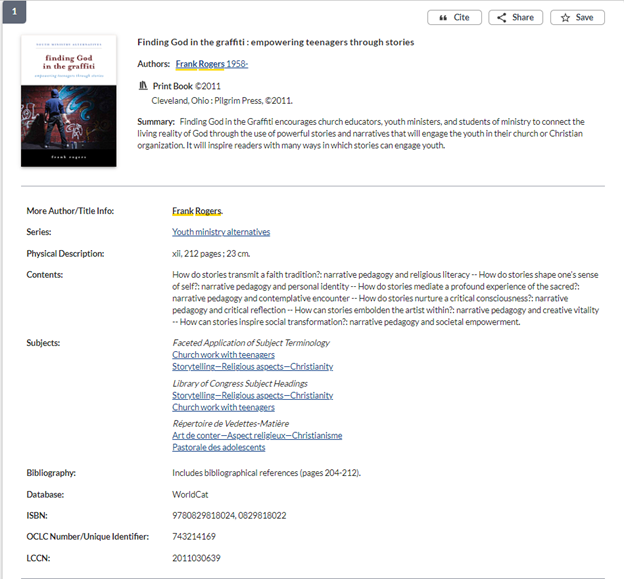
The place of everything in this record is determined by MARC fields. There are many possible fields, so you may see different categories for different types of items. For example, records for journal articles will not usually include the “Series” category or the publication location that’s near the top. There are also a lot of fields that you aren’t seeing but that the system can still read. When you use the checkboxes to narrow your search on the left side of the results page (not shown in this image), you’re asking the system to read various fields, such as those for date or language, to make exclusions from the list it has already given you.
There are two quirks that an advanced researcher should know about:
- Although editors and translators are designated by different MARC fields than authors, for convenience all creators will usually appear in the “Author” category in the record, sometimes–but not always–with their actual designation in parentheses after their name. This is important for your citations. Do not rely on the categories as presented in the catalog for accurate citation information. Make sure to look at the item itself to make sure you’re listing authors, editors, translators, publishers, etc., correctly in your footnotes and bibliographies. It is common to find organizations listed in the catalog on the “Author” line, often for things like conference proceedings where the organization simply convened the conference or funded the work, and shouldn’t be cited as a creator.
- The links in the “Subjects” category are pre-determined headings related to specific MARC fields. They will come up in a general keyword search, but if you click one of the links it will only look for other items with that specific heading designated in a MARC field. That means it will not necessarily find every item associated with that topic, since a librarian or technician had to deliberately choose to include it in the record. Subject headings can be very helpful for browsing and for focusing your searches if you’re getting a lot of irrelevant results, but don’t mistake them for exhaustive lists of everything published on a particular topic. The fact that subject headings are pre-determined makes them poor options for starting your search, because you need to know what the subject heading is called before you can search for it. Further, the way they’re phrased is not always intuitive to specialists in a field, especially if vocabulary or other considerations about the topic have changed since the headings were created. It took years of advocacy by librarians to get the subject heading Illegal aliens changed, and then many libraries had to manually update their records to reflect the change. You can browse the very, very extensive full list of Library of Congress subject headings here (but you can see in the record above that other lists exist, often created by the national libraries of other countries): https://www.loc.gov/aba/publications/FreeLCSH/freelcsh.html