

La recherche en bibliothèque est l'art d'être juste assez spécifique en utilisant un ensemble d'outils simples. Ce guide vous présentera les termes de base, les fonctions et les limites du système DTL, et vous donnera quelques outils pour commencer à créer de meilleures recherches. Il est long, avec beaucoup d'explications et d'exemples. Tout le monde peut ne pas vouloir ou avoir besoin de ce niveau de détail. Si vous voulez juste commencer ou si vous avez besoin d'un rafraîchissement, ici est un excellent guide court sur la recherche booléenne des bibliothèques du MIT. Des instructions très basiques pour utiliser le catalogue et se connecter pour accéder aux documents sont disponibles ici. Les instructions pour accéder à des documents que la DTL ne possède pas sont ici.
Pourquoi ce guide ?
La DTL, comme la plupart des systèmes de bibliothèque et les bases de données auxquelles ils souscrivent, ne fonctionne pas comme une recherche de navigateur Internet. Google et d'autres navigateurs utilisent des algorithmes complexes pour analyser les mots que vous avez tapés dans le champ et déterminer les synonymes et les sujets connexes, faisant parfois des liens avec votre historique Internet personnel. Les résultats que vous obtenez une fois la page chargée peuvent ou non inclure les mots exacts que vous avez tapés. La recherche peut trouver des correspondances parfaites que vous ne saviez pas chercher, et elle peut limiter vos résultats en fonction de facteurs qu'elle ne vous révèle pas, comme votre localisation ou votre historique de navigation. Vous pouvez même formuler votre recherche Google comme une question, et les algorithmes reconnaîtront souvent la syntaxe et renverront des résultats qui répondent à la question.
Le DTL n'a pas ces capacités. Il peut proposer des suggestions de remplissage automatique limitées dans la barre de recherche, mais sinon, il lit exactement ce que vous avez tapé et recherche dans les enregistrements disponibles de manière spécifique. La dernière section de ce guide donne quelques détails techniques pour vous aider à comprendre pourquoi, mais pour la plupart, ce guide se concentrera simplement sur le comment.
Opérateurs booléens de base
Les catalogues de bibliothèques utilisent la logique booléenne pour interpréter vos recherches et fournir des listes de résultats. La logique booléenne est un système de logique vrai/faux basé sur les travaux du mathématicien George Boole. Elle repose sur les trois opérateurs ET, OU et NON. La plupart des langages de programmation informatique ont un moyen d'exprimer et de lire ces opérateurs, et ils constituent un élément fondamental des recherches dans les bibliothèques numériques depuis des décennies.
Ce guide utilisera italique pour indiquer des termes de recherche, car les guillemets et certaines autres ponctuations, comme vous le verrez, ont des significations spécifiques qui modifieront votre recherche. Pour éviter toute confusion, les titres d'œuvres et les mots accentués seront souligné. Il n’est pas nécessaire d’utiliser l’italique lorsque vous effectuez une recherche dans la base de données DTL. De même, ce guide présentera les trois opérateurs booléens de base en majuscules, comme dans le paragraphe précédent, afin qu’ils soient facilement repérables et identifiables en tant qu’opérateurs. Le système de la bibliothèque ne fait pas la distinction entre majuscules et minuscules. Vous pouvez saisir les opérateurs en majuscules si cela vous aide, mais cela n’aura aucune incidence sur le système. Vous remarquerez également que, tout au long de ce guide, les noms propres dans les expressions de recherche peuvent être écrits en majuscules ou en minuscules. Le système ne fera pas la distinction entre Rogers et Rogers.
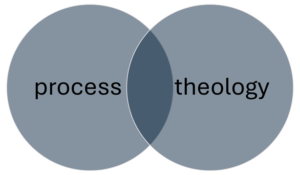
L'opérateur le plus courant et celui par défaut est ET. Lorsque vous tapez une expression de plusieurs mots dans la barre de recherche, comme théologie du processus, le système lit processus ET théologie. Il recherchera tout enregistrement qui contient les deux les mots processus et théologie n'importe où dans l'enregistrement, mais cela ne fera aucune différence si ces mots sont utilisés ensemble ou comment ils sont utilisés ensemble. Donc un livre intitulé La théologie du processus en tant que théologie politique s'affiche dans la même liste de résultats qu'un livre intitulé Théologie interculturelle avec le terme générique “ processus ” figurant quelque part dans la description.
Cela ne signifie pas que cette méthode de recherche la plus élémentaire ne fonctionne pas. Comme la “ théologie du processus ” est un terme technique et qu’il existe de nombreux livres et articles à ce sujet dans la DTL, si vous recherchez simplement l’expression théologie du processus vous y trouverez de nombreuses ressources utiles. D'ailleurs, il suffit de taper processus, vous recevez le journal Études de processus sur la première page de résultats. Vous obtenez toutefois également beaucoup de résultats non pertinents ; si vous vous retrouvez à devoir passer au crible de nombreux résultats inutiles, vous devrez peut-être reformuler votre recherche.
Ajouter plus de mots affinera naturellement votre recherche. S'il y a 10 000 enregistrements avec les deux processus et théologie quelque part en eux, en ajoutant philosophie supprimera n'importe lequel de ces 10 000 sans ce troisième mot. Plus vous ajoutez de mots à une recherche de base comme celle-ci, plus elle sera ciblée et donc plus limitée. La plupart du temps, vous pouvez trouver un livre ou un article spécifique en tapant simplement le nom de famille de l'auteur et deux ou trois mots importants du titre. Allez au DTL et recherchez la phrase graffiti de rogers dieu. Vous devriez vous procurer le livre du professeur Frank Rogers du CST. Découvrir Dieu dans les graffitis en tant que premier ou deuxième résultat.
- Astuce : Parfois, pendant que vous tapez, le système vous propose une liste déroulante de termes de recherche potentiels. Vous pouvez sélectionner un de ces termes s'il correspond à ce que vous recherchez, ou ignorer la liste et faire votre propre recherche. Si vous décidez d'ignorer la liste déroulante, vous devrez peut-être cliquer manuellement sur le bouton de recherche à droite de la barre de recherche, car parfois le premier élément de la liste déroulante est automatiquement sélectionné. Si vous appuyez simplement sur la touche Entrée pour lancer la recherche, elle portera sur cet élément au lieu de ce que vous avez tapé. Tous les systèmes informatiques ont leurs petites fonctionnalités agaçantes, et celle-ci est l'une des particularités du catalogue DTL.
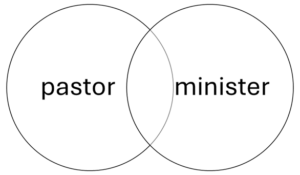
L'opérateur « OR » constitue un moyen pratique de varier la formulation de vos recherches. Cet opérateur s'avère particulièrement utile lorsque vous utilisez des synonymes. La recherche processus OU théologie trouvera tous les enregistrements avec le mot processus et chaque enregistrement avec le mot théologie, y compris des documents les concernant tous les deux. C'est probablement beaucoup trop, et la plupart d'entre eux seront sans rapport. Mais vous cherchez peut-être des documents sur les professionnels religieux protestants. Vous pouvez taper pasteur ou ministre pour obtenir une gamme de.
Comme OR est susceptible de trouver un nombre de résultats beaucoup plus important que AND, il est préférable de l'utiliser avec précaution ou en combinaison avec d'autres opérateurs.
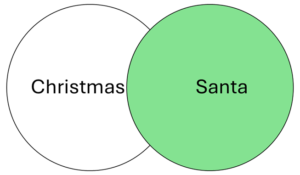
C'est l'opérateur le plus difficile, car il est facile d'éliminer accidentellement des éléments que vous pourriez vouloir voir. Il est préférable d'utiliser NOT lorsque vous recherchez un terme qui a des utilisations dans des contextes très différents ou si vous souhaitez éliminer des éléments sur un sous-thème obscur.
Disons que vous souhaitez faire des Noël Pas Le Père Noël, (la section ci-dessous sur les guillemets expliquera comment inclure le nom complet du Père Noël dans cette recherche), mais cela pourrait signifier que vous ne verrez pas les enregistrements de livres qui seraient principalement utiles mais qui incluent un chapitre facilement ignoré sur le Père Noël. Ce n'est peut-être pas le bon moment pour utiliser `NOT`.
Cependant, NOT peut s'avérer utile dans d'autres cas. Imaginons que vous tapiez Noël dans le catalogue et obtenir des millions de résultats, mais pour une raison quelconque, beaucoup des premiers résultats sont des documents sur la plante parfois appelée cactus de Noël. Dans ce cas, vous pouvez essayer Noël PAS cactus ou Noël PAS botanique ou quelque chose de similaire pour éliminer ces résultats non pertinents. La DTL a accès à de nombreux journaux médicaux car ils sont inclus dans certains autres abonnements, de sorte que vous pourriez vous retrouver dans des situations où vous ajoutez PAS de médecine ou similaire peut aider à désencombrer vos résultats.
Vous pouvez également utiliser « NOT » pour exclure de vos résultats les sous-thèmes les moins connus. Le Père Noël fait partie intégrante de Noël aux États-Unis ; utiliser « NOT » pour éviter les documents le concernant pourrait donc se retourner contre vous. En revanche, le personnage européen du Krampus n’a acquis une grande notoriété aux États-Unis que récemment. Si les célébrations de Noël en Allemagne et en Autriche ne vous intéressent pas, vous pouvez peut-être utiliser l’expression Noël PAS Krampus vous aidera à affiner votre recherche.
- Astuce : Il. Alexandrie ET Égypte vous donnera des résultats plus pertinents que Alexandrie PAS Virginie, à la fois parce qu'il identifie positivement votre cible, et parce que vous n'éliminerez pas accidentellement des livres sur la ville égyptienne qui se sont avérés être écrits par des universitaires nommés Virginia.
- Astuce : Les phrases négatives ne dépendent pas de l'ordre, ce qui signifie Noël Pas Le Père Noël est une recherche différente de Père Noël PAS Noël. Voir la section ci-dessous sur les parenthèses pour en savoir plus sur la syntaxe et l'ordre dans les chaînes de recherche.
Ponctuation et opérateurs de combinaison
ET, OU et NON sont les éléments de base de la recherche dans une bibliothèque, mais avec quelques symboles supplémentaires et une compréhension de la syntaxe des opérateurs, vous pouvez affiner vos recherches pour tirer le meilleur parti de la bibliothèque.
Après les trois opérateurs de base, les guillemets sont la fonctionnalité la plus utile de la syntaxe de recherche de bibliothèque. Rappelez-vous comment la recherche théologie du processus signifie vraiment processus ET théologie dans le langage du système ? Les guillemets indiqueront au système de lire “théologie du process” maintenant, au lieu de trouver tous les enregistrements qui contiennent ces deux mots quelque part, il ne trouvera que les enregistrements où ces mots apparaissent ensemble dans cette configuration exacte. Cela peut être utile si vous recherchez un terme technique très spécifique composé de mots plus génériques (comme, en effet, la théologie du processus), ou vous pouvez l'utiliser pour rechercher des œuvres spécifiques par leur titre. Dans le Noël Pas Le Père Noël exemple ci-dessus, vous pourriez utiliser des guillemets pour rechercher Noël PAS “ Père Noël ” si c'était important d'indiquer le nom complet.
Les astérisques (cette petite étoile que vous pouvez utiliser en appuyant simultanément sur les touches Maj et 8 sur un clavier standard en langue anglaise) sont très utiles pour rechercher des sujets où un mot racine peut être accompagné de plusieurs terminaisons possibles.
Au lieu de faire des recherches séparées pour les mots théologie, théologique, théologiser, et theologian to make sure you get everything you need, you can simply search for theolog*, and the system will search for the typed letters with any ending. As you can imagine, this is more useful with some roots than with others. For most people, the example of theolog* is probably actually much too broad. Similarly, the search Christ* will get you results with Christ, Christian, Christianity, and Christmas, as well as Christopher, Christchurch, christendom, Christina, christen, and on and on. Make sure to type as much of the word as you possibly can without excluding the endings you want to see (theolog* instead of theo* or, worse, the*). With a few exceptions, roots less than four or five letters probably won’t be helpful.
Asterisks are most useful where you don’t want to differentiate between singular and plural, or where a root might have equally relevant forms in different parts of speech (a noun, verb, adjective, etc., such as Jew et Jewish ou oblige et obligation). Adding another operator can help limit the search if there are too many results. For example, the endless possibilities of the term christ* might be narrowed down a very little bit with christ* AND england ou christ* AND scripture.
Parentheses enable you to combine multiple operators and determine the order in which they’re read. The system will perform the segment of the string inside in the innermost parentheses first, and then will use the results of that operation to perform the next one.
If you type the phrase with different operators, the system will read the AND operation first. In the string pastor AND Methodist OR Presbyterian, the system will give you all the results that combine the words pastor et Methodist, plus all the results with Presbyterian, whether or not the word pastor is present. If you put AND pastor on the other side of Presbyterian it will still read the AND first. You’d get a lot of things about Presbyterian pastors plus a lot of things about Methodists.
But that probably isn’t what you meant. Instead, use the string pastor AND (Methodist OR Presbyterian). The system will first find all of the records containing either of the words Methodist et Presbyterian, then will narrow the results by selecting the records that also contain the word pastor. You can create even more steps by nesting the parentheses: education AND (pastor AND (Methodist OR Presbyterian)) might be a roundabout way to look for research on denominational seminaries. Make sure to count your parentheses and close all of your phrases.
You can also use parentheses to search for terms that have important synonyms, and you can use multiple separate parenthetical phrases in the same string, like (bible OR scripture) AND (Hebrew OR Jewish).
- Tip: You can create strings as long and as nested as you want, although if your searches are getting very complicated there’s probably an easier way. Try finding different search terms, such as seminary AND (Methodist OR Presbyterian) ou seminar* AND denomination* instead of education AND (pastor AND (Methodist OR Presbyterian)) or, if you’re getting very, very specific, head to Google to find the title of the individual book you’re looking for.
- Tip: You don’t need parentheses if you’re using the same operator throughout your string or if you have only one operator. Methodist AND Presbyterian AND Baptist is the same as if you put parentheses anywhere in that string. You only need parentheses when you’re mixing AND, OR, and NOT.
- Tip: It doesn’t matter what order you put things in if you’re using parentheses correctly. (Methodist OR Presbyterian) AND pastor should find the same results as the example above. You could also switch the order of Methodist et Presbyterian.
To increase efficiency, the system will ignore some words, called stop words. Inclusion of these words as part of the search string would return most or even literally all of the records available.
The most common stop words are:
- articles (a, an, the)
- most small prepositions (in, out, of, by, to, on, etc.)
- the verb be and many of its conjugations (are, is, etc.)
- subordinating conjunctions (if, which, that, etc.)
Sometimes it’s easier to type what’s in your head or what you’re used to typing, rather than take the time to sort through all of the things that are irrelevant, even if the parsed version is simpler. The searches bible et the Bible will get you the same results, so there’s no harm in including stop words or capital letters if it would take more effort to stop yourself from typing them. The important thing to remember is that the system doesn’t understand normal English, so including stop words won’t improve your results. The phrase law in the bible is identical, as far as the system is concerned, to law AND bible. If you want to distinguish Deuteronomistic legal codes from modern laws about or based on the Bible, you need to construct a search using distinct terms, such as torah ou “deuteronomistic code”.
Of course, stop words and the operators AND, OR, and NOT are normal words that often appear in titles. If you’re looking for a specific work, this is easy to get around in two ways:
- You can choose distinctive words from the title, such as god graffiti ou finding god graffiti (including the author’s name for good measure, if you want).
- You can use quotation marks, as in “finding god in the graffiti”.
If the title doesn’t contain any especially distinctive words and you need to include a stop word or an operator word to find it (for example, the book Jesus Christ is not God), quotation marks are the best solution.
Tip: It is very difficult to find full lists of stop words. The ones listed above are safe to assume, but longer prepositions like above, through, or along may or may not be excluded from your searches. Trial and error is a good strategy, and when in doubt, quotation marks will always make sure those words are included. You can even put quotation marks around a single word.
An easy and usually reliable way to search for a resource you already know about is to search for the author’s name plus two or three major words from the title. Above, we tried the example graffiti de rogers dieu. This works nearly all the time, if the title and the author’s name are distinct enough.
But what if they aren’t distinct (a frequent problem in biblical studies, where it’s common to find dozens of books with titles like The Gospel of Matthew ou Deuteronomy)? Or what if you remember the book’s title, but without the author’s name you aren’t getting the correct results? Or what if you simply want to see all of the available works by a specific author?
Enter the index identifiers. All of the searches so far in this guide have been keyword searches, which means that they do not specify a particular part of the record to search, and therefore search the entire record. But catalog records are divided into distinct sections. These are explained a little more fully in the section of this guide called Technical Stuff, but for now you just need to know that they exist and you can specify them in your searches.
The most common index identifiers are:
- au = author (In the DTL this will also find editors, translators, other creators and sometimes contributors.)
- ti = title
- su = subject (This searches specific sections of the catalog record, and will not necessarily find all items that could be considered to belong to that subject. See the Technical Stuff section for more.)
To use these identifiers, type them with a colon (:) or equal sign (=) before the search term. You can also use them with other operators, quotation marks, and parentheses, and all of the usual rules apply. Here are a few different ways to find Dr. Rogers’s book:
- ti: “finding god in the graffiti”
- au: Frank Rogers
- au: “Frank Rogers”
- graffiti AND au: rogers
You can also search for an author’s works by finding one of them through a keyword or title search and then clicking on the author’s name where it appears as a link in the record.
- Tip: Although it appears in one of the examples, it’s usually best not to search for an author’s name in quotation marks. This is because not all authors are identified in the system by simply their first and last name. Many authors use initials, shortened names, or middle names, which don’t always appear in the same ways on all of their publications. Some people, often women, may have published under two or three names at different times in their careers, and some authors with Asian or African names adopt Western names that may appear differently in different publications. Librarians have ways of collecting all of these names under a single author record, but the record name might not be the one you’re expecting. Quotation marks may be helpful to distinguish two authors with similar names, but only if you’re sure of the record name.
Dans les coulisses
This section is for people who want to do deep searches, such as finding all or nearly all of the available literature on a topic. It includes a basic description of the technical structures underlying the operations that this guide has already discussed. This provides context for why the catalog works the way it does, which will be helpful as you try to get the most out of it.
Each item in a library catalog has a unique record created using a database cataloging format called machine readable cataloging (MARC). A MARC record consists of many fields whose contents are determined by numbers. For example, field 100 indicates the primary author of a work, and field 245 indicates the title. You won’t see these fields directly, but you can manipulate your searches to make use of them.
Here is a typical DTL catalog record for a book:
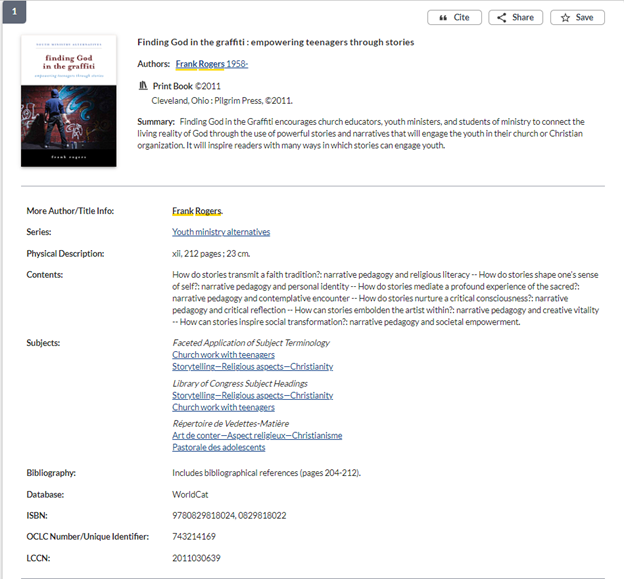
The place of everything in this record is determined by MARC fields. There are many possible fields, so you may see different categories for different types of items. For example, records for journal articles will not usually include the “Series” category or the publication location that’s near the top. There are also a lot of fields that you aren’t seeing but that the system can still read. When you use the checkboxes to narrow your search on the left side of the results page (not shown in this image), you’re asking the system to read various fields, such as those for date or language, to make exclusions from the list it has already given you.
There are two quirks that an advanced researcher should know about:
- Although editors and translators are designated by different MARC fields than authors, for convenience all creators will usually appear in the “Author” category in the record, sometimes–but not always–with their actual designation in parentheses after their name. This is important for your citations. Do not rely on the categories as presented in the catalog for accurate citation information. Make sure to look at the item itself to make sure you’re listing authors, editors, translators, publishers, etc., correctly in your footnotes and bibliographies. It is common to find organizations listed in the catalog on the “Author” line, often for things like conference proceedings where the organization simply convened the conference or funded the work, and shouldn’t be cited as a creator.
- The links in the “Subjects” category are pre-determined headings related to specific MARC fields. They will come up in a general keyword search, but if you click one of the links it will only look for other items with that specific heading designated in a MARC field. That means it will not necessarily find every item associated with that topic, since a librarian or technician had to deliberately choose to include it in the record. Subject headings can be very helpful for browsing and for focusing your searches if you’re getting a lot of irrelevant results, but don’t mistake them for exhaustive lists of everything published on a particular topic. The fact that subject headings are pre-determined makes them poor options for starting your search, because you need to know what the subject heading is called before you can search for it. Further, the way they’re phrased is not always intuitive to specialists in a field, especially if vocabulary or other considerations about the topic have changed since the headings were created. It took years of advocacy by librarians to get the subject heading Illegal aliens changed, and then many libraries had to manually update their records to reflect the change. You can browse the very, very extensive full list of Library of Congress subject headings here (but you can see in the record above that other lists exist, often created by the national libraries of other countries): https://www.loc.gov/aba/publications/FreeLCSH/freelcsh.html